


第一步:获取正确的配置文件
不要手写配置文件,直接从官方 2.5.0 镜像中复制标准的 application.yml 出来,然后在此基础上修改。
启动一个临时的 2.5.0 容器(如果当前容器已挂载错误配置,先停止它):
docker run -d --name seata-temp apache/seata-server:2.5.0
复制配置文件到宿主机:
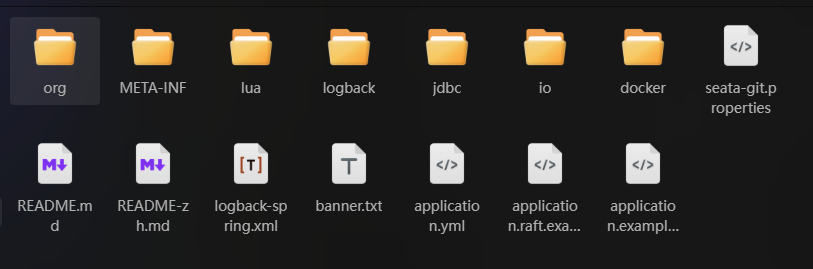
docker cp seata-temp:/seata-server/resources ./resources (此时你的当前目录下应该会有一个标准的 application.yml)
停止并删除临时容器:
docker rm -f seata-temp第二步:配置注册中心和配置中心
根据 Seata 2.x 的规范,主要的配置通常在 application.yml 中。你可以使用编辑器(如 vi)打开并修改它:
把注册中心和配置中心改为自己的服务地址
#
# Licensed to the Apache Software Foundation (ASF) under one or more
# contributor license agreements.  See the NOTICE file distributed with
# this work for additional information regarding copyright ownership.
# The ASF licenses this file to You under the Apache License, Version 2.0
# (the "License"); you may not use this file except in compliance with
# the License.  You may obtain a copy of the License at
#
#     http://www.apache.org/licenses/LICENSE-2.0
#
# Unless required by applicable law or agreed to in writing, software
# distributed under the License is distributed on an "AS IS" BASIS,
# WITHOUT WARRANTIES OR CONDITIONS OF ANY KIND, either express or implied.
# See the License for the specific language governing permissions and
# limitations under the License.
#
server:
  port: 8091
spring:
  application:
    name: seata-server
  main:
    web-application-type: none
logging:
  config: classpath:logback-spring.xml
  file:
    path: ${log.home:${user.home}/logs/seata}
  extend:
    logstash-appender:
      # off by default
      enabled: false
      destination: 127.0.0.1:4560
    kafka-appender:
      # off by default
      enabled: false
      bootstrap-servers: 127.0.0.1:9092
      topic: logback_to_logstash
      producer:
        acks: 0
        linger-ms: 1000
        max-block-ms: 0
    metric-appender:
      # off by default
      enabled: false

seata:
  config:
    # support: nacos, consul, apollo, zk, etcd3
    type: nacos
    nacos:
      server-addr: 192.168.100.20:8848
      namespace:
      group: DEFAULT_GROUP
      context-path:
      ##1.The following configuration is for the open source version of Nacos
      username:
      password:
      ##2.The following configuration is for the MSE Nacos on aliyun
      #access-key:
      #secret-key:
      ##3.The following configuration is used to deploy on Aliyun ECS or ACK without authentication
      #ram-role-name:
      data-id: seataServer.properties
  registry:
    # support: nacos, eureka, redis, zk, consul, etcd3, sofa
    type: nacos
    nacos:
      application: seata-server
      server-addr: 192.168.100.20:8848
      group: DEFAULT_GROUP
      namespace:
      cluster: default
      context-path:
      ##1.The following configuration is for the open source version of Nacos
      username:
      password:
      ##2.The following configuration is for the MSE Nacos on aliyun
      #access-key:
      #secret-key:
      ##3.The following configuration is used to deploy on Aliyun ECS or ACK without authentication
      #ram-role-name:
#   store:
#     # support: file 、 db 、 redis 、 raft
#     mode: file
  #  server:
  #    service-port: 8091 #If not configured, the default is '${server.port} + 1000'
第三步:在 Nacos 中创建 Seata 配置文件
创建命名空间 seata-server
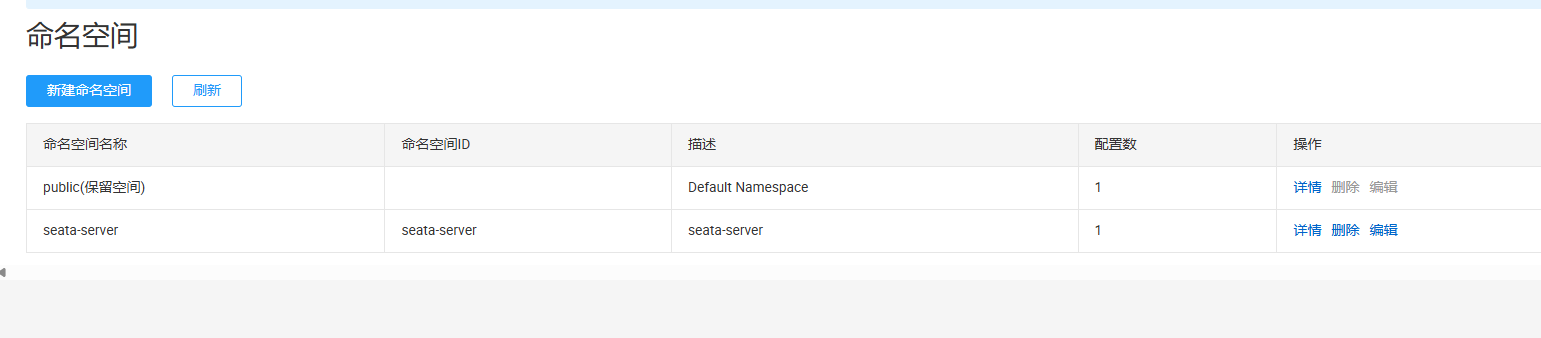
在命名空间 seata-server下创建seataServer.properties配置文件
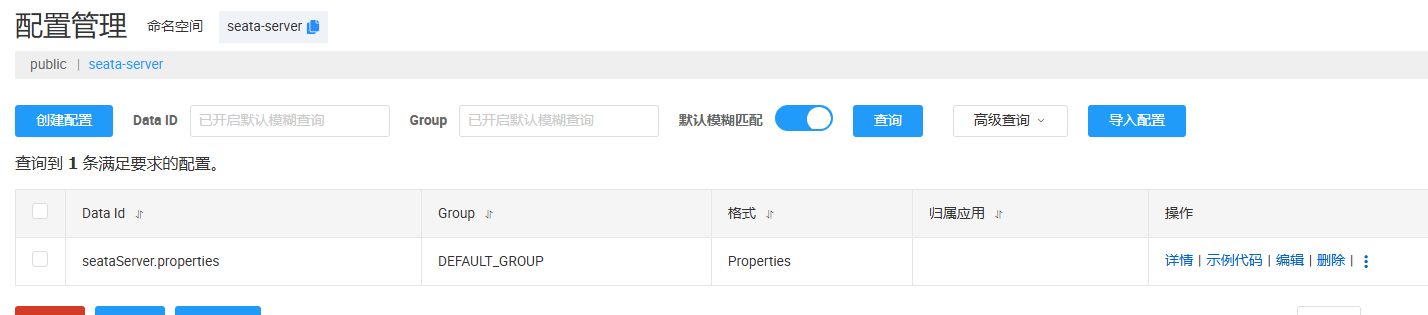
文件内容:
# ======================== 事务存储配置 ========================
# 存储模式改为 db
store.mode=db
# 锁存储模式,通常跟随 store.mode
store.lock.mode=db
# 会话存储模式,通常跟随 store.mode
store.session.mode=db

# ======================== 数据库连接配置 ========================
# 数据库源类型
store.db.datasource=druid
# 数据库类型
store.db.dbType=postgresql
# 驱动类名 (PostgreSQL 标准驱动)
store.db.driverClassName=org.postgresql.Driver
# 数据库连接 URL
# 修正说明:PostgreSQL 的 URL 参数与 MySQL 不同,去掉了 useUnicode 等无效参数,增加了 currentSchema
store.db.url=jdbc:postgresql://192.168.100.20:5432/seata-server?currentSchema=public
# 数据库用户名
store.db.user=root
# 数据库密码
store.db.password=root

# ======================== 连接池配置 ========================
store.db.minConn=5
store.db.maxConn=30
store.db.maxWait=5000
# 验证连接是否有效的 SQL (PostgreSQL 常用)
store.db.validationQuery=SELECT 1

# ======================== 数据库表名 ========================
store.db.globalTable=global_table
store.db.branchTable=branch_table
store.db.lockTable=lock_table
# 分布式锁表 (Seata 高版本需要)
store.db.distributedLockTable=distributed_lock

# ======================== 事务会话相关配置 ========================
# undo log 保留天数
server.undo.logSaveDays=7
# undo log 清理频率 (毫秒)
server.undo.logDeletePeriod=86400000
# 最大重试超时时间 (-1 表示无限重试)
server.maxCommitRetryTimeout=-1
server.maxRollbackRetryTimeout=-1
# 异步提交重试间隔 (毫秒)
server.recovery.committingRetryPeriod=1000
server.recovery.asynCommittingRetryPeriod=1000
server.recovery.rollbackingRetryPeriod=1000
server.recovery.timeoutRetryPeriod=1000
第四步:初始化数据库数据
访问github获取最新建表语句
https://github.com/apache/incubator-seata/tree/develop/script/server/db
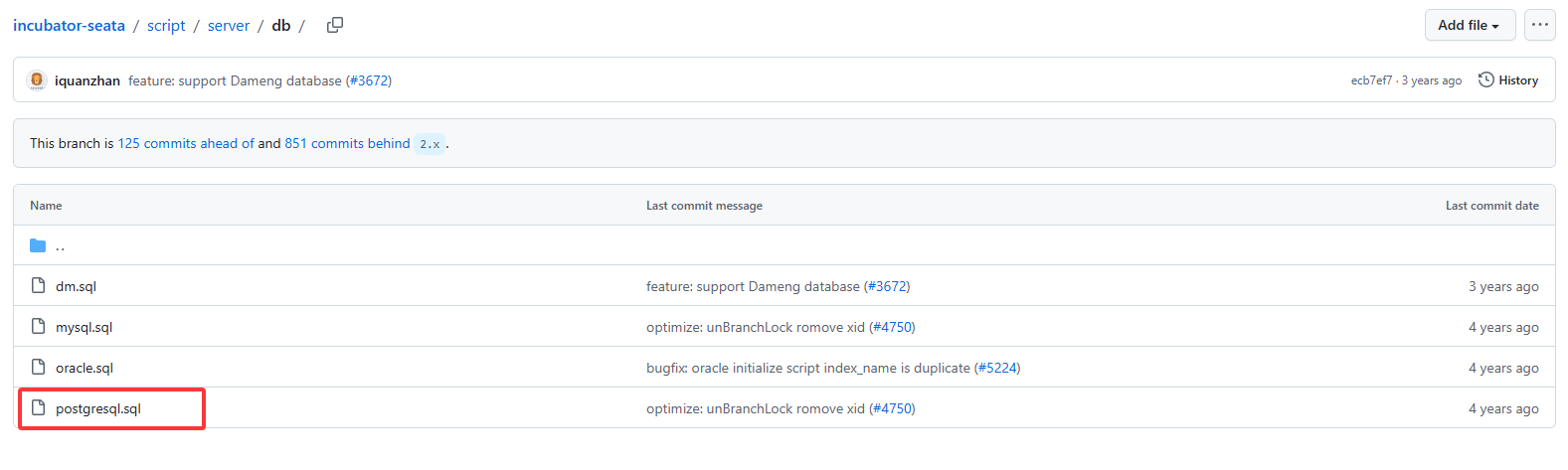
我这里使用的是pgsql
-- -------------------------------- The script used when storeMode is 'db' --------------------------------
-- the table to store GlobalSession data
CREATE TABLE IF NOT EXISTS public.global_table
(
    xid                       VARCHAR(128) NOT NULL,
    transaction_id            BIGINT,
    status                    SMALLINT     NOT NULL,
    application_id            VARCHAR(32),
    transaction_service_group VARCHAR(32),
    transaction_name          VARCHAR(128),
    timeout                   INT,
    begin_time                BIGINT,
    application_data          VARCHAR(2000),
    gmt_create                TIMESTAMP(0),
    gmt_modified              TIMESTAMP(0),
    CONSTRAINT pk_global_table PRIMARY KEY (xid)
);

CREATE INDEX idx_status_gmt_modified ON public.global_table (status, gmt_modified);
CREATE INDEX idx_transaction_id ON public.global_table (transaction_id);

-- the table to store BranchSession data
CREATE TABLE IF NOT EXISTS public.branch_table
(
    branch_id         BIGINT       NOT NULL,
    xid               VARCHAR(128) NOT NULL,
    transaction_id    BIGINT,
    resource_group_id VARCHAR(32),
    resource_id       VARCHAR(256),
    branch_type       VARCHAR(8),
    status            SMALLINT,
    client_id         VARCHAR(64),
    application_data  VARCHAR(2000),
    gmt_create        TIMESTAMP(6),
    gmt_modified      TIMESTAMP(6),
    CONSTRAINT pk_branch_table PRIMARY KEY (branch_id)
);

CREATE INDEX idx_xid ON public.branch_table (xid);

-- the table to store lock data
CREATE TABLE IF NOT EXISTS public.lock_table
(
    row_key        VARCHAR(128) NOT NULL,
    xid            VARCHAR(128),
    transaction_id BIGINT,
    branch_id      BIGINT       NOT NULL,
    resource_id    VARCHAR(256),
    table_name     VARCHAR(32),
    pk             VARCHAR(36),
    status         SMALLINT     NOT NULL DEFAULT 0,
    gmt_create     TIMESTAMP(0),
    gmt_modified   TIMESTAMP(0),
    CONSTRAINT pk_lock_table PRIMARY KEY (row_key)
);

comment on column public.lock_table.status is '0:locked ,1:rollbacking';
CREATE INDEX idx_branch_id ON public.lock_table (branch_id);
CREATE INDEX idx_xid ON public.lock_table (xid);
CREATE INDEX idx_status ON public.lock_table (status);

CREATE TABLE distributed_lock (
    lock_key     VARCHAR(20)  NOT NULL,
    lock_value        VARCHAR(20)  NOT NULL,
    expire       BIGINT       NOT NULL,
    CONSTRAINT pk_distributed_lock_table PRIMARY KEY (lock_key)
);

INSERT INTO distributed_lock (lock_key, lock_value, expire) VALUES ('AsyncCommitting', ' ', 0);
INSERT INTO distributed_lock (lock_key, lock_value, expire) VALUES ('RetryCommitting', ' ', 0);
INSERT INTO distributed_lock (lock_key, lock_value, expire) VALUES ('RetryRollbacking', ' ', 0);
INSERT INTO distributed_lock (lock_key, lock_value, expire) VALUES ('TxTimeoutCheck', ' ', 0);
第五步:Docker Compose部署启动
编写docker-compose.yaml
version: "3.1"
services:
  seata-server:
    image: apache/seata-server:2.5.0
    ports:
      - "7091:7091"
      - "8091:8091"
    environment:
      # 重要:将 seata_ip 替换为你宿主机的局域网IP,否则客户端可能无法连接
      - SEATA_IP=192.168.100.20
      - SEATA_PORT=8091
    volumes:
      - "/usr/share/zoneinfo/Asia/Shanghai:/etc/localtime"        #设置系统时区
      - "/usr/share/zoneinfo/Asia/Shanghai:/etc/timezone"         #设置时区
      # 挂载刚才修改的 application.yml
      - "./resources:/seata-server/resources"
启动新容器:
docker-compose up -d查看Naocs中seata是否注册成功

评论